For coaches
Getting started as a coach on ChessPeak
Apply, invite your students, put them in groups, and see what each of them is training. It takes a few minutes.
2 min read
ChessPeak gives a coach one place to follow students' training, give homework and see exactly what each student played. Setting it up takes a few minutes.
- 1Create a free account, open Settings and choose Apply to become a coach. Tell us briefly about your coaching and add your FIDE ID. We review every application by hand.
- 2Once you are approved, the Coaching Corner appears on your home screen.
- 3Invite your students. Share your personal invite link, or invite them by their ChessPeak username; they accept the invite from their notifications.
- 4Put your students into groups, for example one per class. Then you can give homework to a whole group at once.
What your students see
Students keep training as before. Homework from you appears on their home screen under From your coach and in their notifications, with the deadline and their progress, and one tap takes them back to where they stopped.
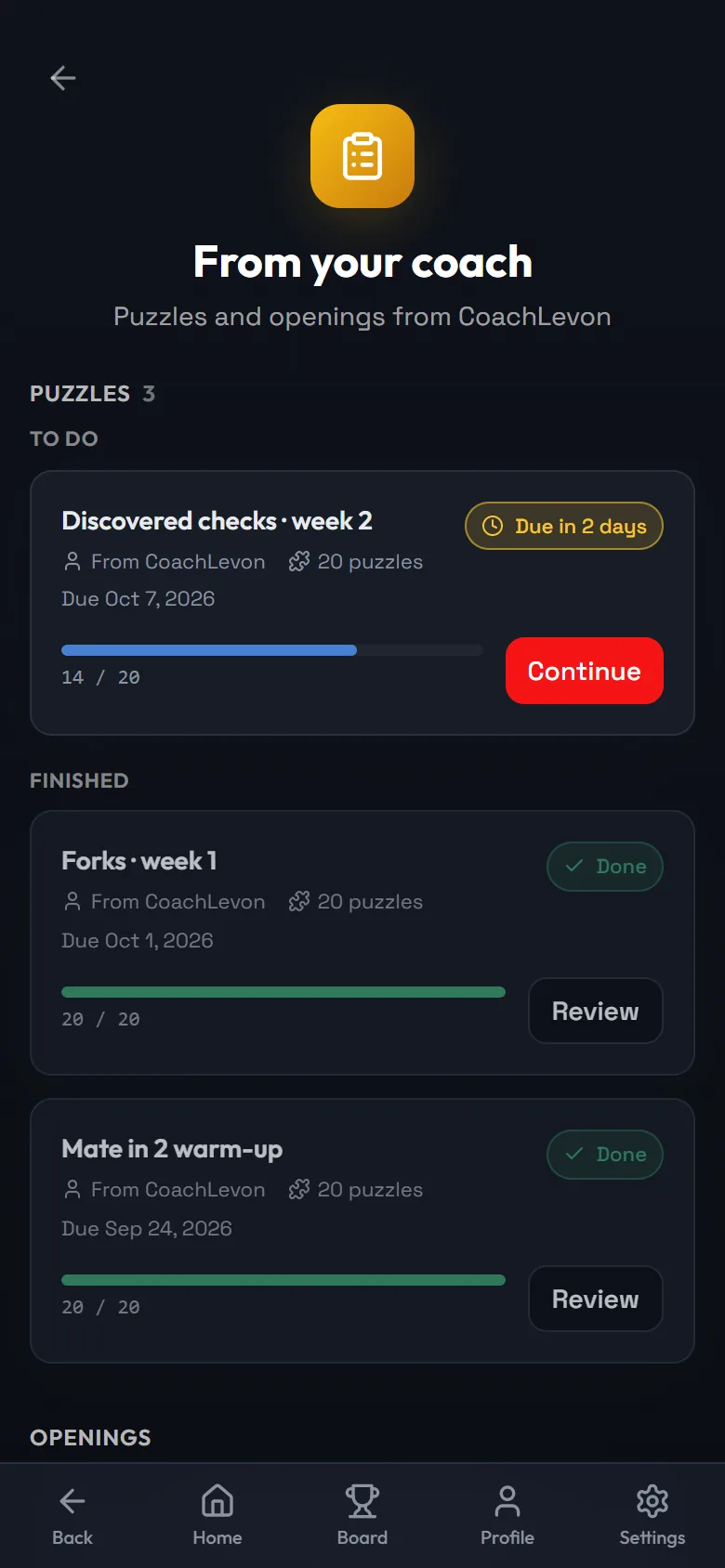
- 1The deadline you set
- 2Back to where they stopped
- 3Finished homework stays here to review
What you see for every student
- Points, streak and when they were last active.
- The mountains they are climbing and the ones they finished, with accuracy.
- Every puzzle they solved, with the time it took and the number of tries.
- For any puzzle, the exact wrong moves they played.
Start small: one group and one homework of 20 puzzles with a deadline a week away. The group page will show who started and who finished.