For coaches
Homework your students actually finish
The right size, a clear deadline and a quick follow-up. How to set homework on ChessPeak and see who did it.
2 min read
Homework works when it is the right size, has a clear deadline, and you follow it up. ChessPeak takes care of the first two and makes the third take a minute.
Choose the puzzles
Every homework is a set from your library. Make one from the puzzle database: pick themes, a rating range and any number of puzzles from 5 to 100. Or make one from your own PGN file or a Lichess study. Every student gets the same puzzles.
A deadline, or none
A deadline, up to 90 days ahead, makes the homework count. You can also give homework with no deadline: students solve it whenever they like and are never late.
Keep it small
A student can have up to five open homework at a time. Twenty puzzles a week that get finished do more than a hundred that get abandoned.
Follow up from the group page
The group page shows the current homework as given, started and finished, with the names of those who have not started yet. That is the list to message before the next lesson.
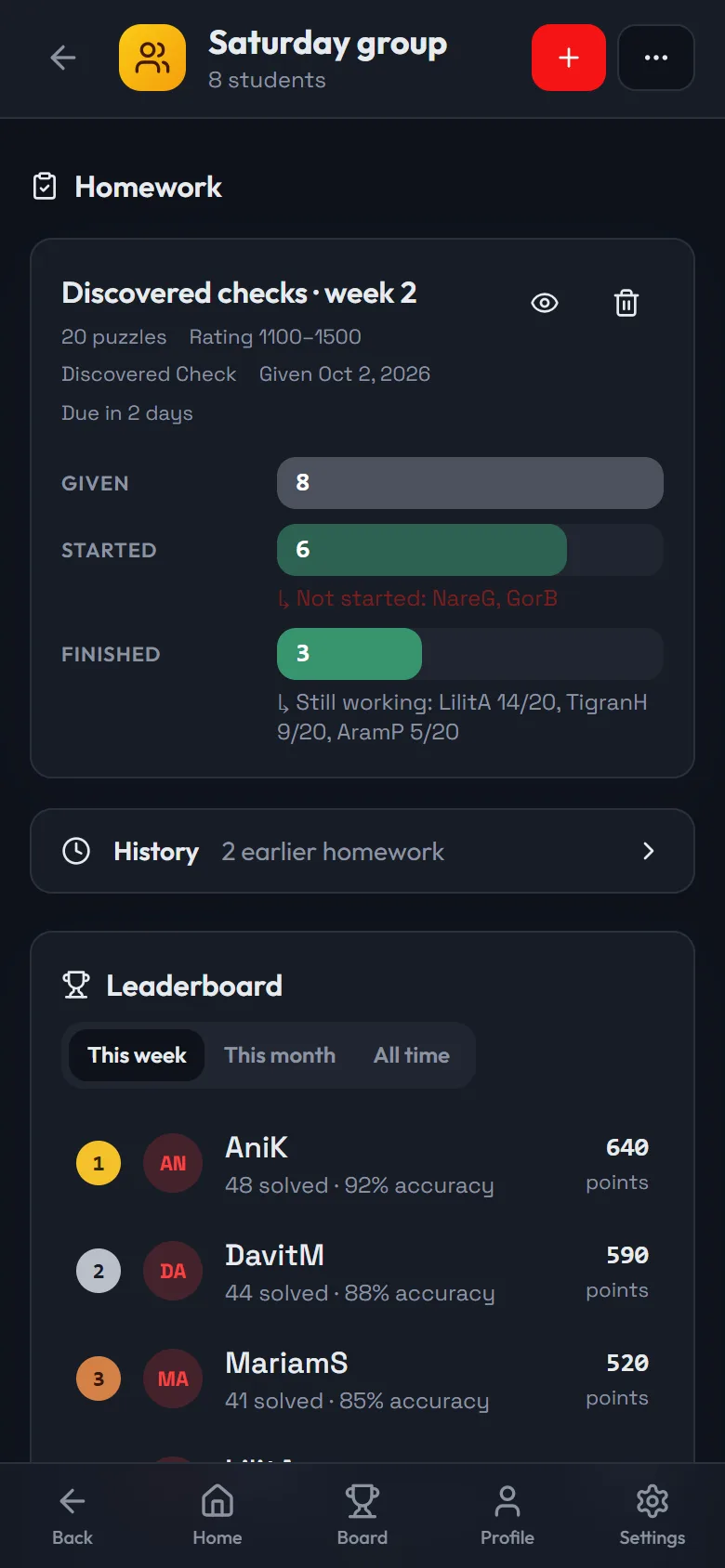
- 1Give homework to the whole group
- 2Who started and who finished, by name
- 3The group's leaderboard for the week
Yellow cards, not penalties
Homework finished after its deadline, or not finished by it, gets a yellow card. Nothing is locked and no points are lost. If a student had a good reason, excuse it and the card goes away. You can also give one student more time.
A leaderboard for the group
Each group has its own leaderboard for the week, the month and all time, with points, puzzles solved and accuracy. Students see their group's leaderboard next to their homework.